Thursday, July 7, 2016

Microservices

There has been a lot of hype around microservices over the last couple of years.  I've been doing a fair bit of research and experimentation with this architecture and think it is the perfect fit for certain large project but needs to be adopted with very careful consideration. 

The positives are undeniable, having independently deploy-able, language agnostic services that can be tested in isolation definitely has the potential to scale well.  This will also add much needed flexibility that is lacking in many complex systems. 

However for many projects this architecture will introduce significant real world challenges including:

Code Reuse: When I started looking into Microservices the following question kept coming up "Where should I draw the line between having shared class libraries vs moving common code into a new shared services?"

Shared class libraries are frowned upon by many purists because it goes against the independence paradigm of microservices and will thus reduce some of the benefits of having services that are truly decoupled .  However not having a shared class library is likely to result in significant refactoring of code when logic that should of been shared is moved from one service to another.  This has the potential to be expensive and may result in many other interdependent services being affected. Obviously this kind of problem exists with non-microservice architectures however changing a class library, compiling and then fixing every compilation error as well as using built in refactoring functionality in IDE's such as Visual Studio is likely to be easier than refactoring services across a varied technology stack and having to rely on excellent unit test coverage to ensure everything is picked up.

 As is often the cases with tight deadlines and limited budgets there will be cases where moving common code into a new service becomes too costly and/or risky and developers will end up redundantly replicating code which breaks the DRY design principle and will reduce the overall maintainability of the system.

Debugging: It is likely to add complexity to debugging when a developer needs to step through code across independent, queued, services calls through logic that is implemented in a variety of technologies.

Language Agnostic: One of the commonly spruiked advantages of microservices is that they are language agnostic. However without careful consideration this can lead to the creation of a very complex technology stack.  This may make maintainability an issue because software currency upgrades and patches will become more complex and because finding experts who have experience with a varied technology stack become more difficult to find.

Version and Deployment Control: This one is pretty obvious.  It can be difficult enough trying enforce consistent and understandable version numbering accross an n-tiered application.  Try having hundreds of services and multiple persistence repositories and this can get very confusing and difficult to control.

Refactoring: Undoubtedly deciding when to create a new service, merge two or more services, or split existing services into multiple services will be a relatively common occurrence.  This will have a cost because merging or splitting services could result in hundreds of services and potentially thousands of test cases being significantly affected.

So in summary, microservices architecture certainly has some advantages but it will work best when some very careful guidelines and standards are put in place across a project team to address some of the issues I've detailed above. 

Thursday, May 5, 2016

Location services shortcut

We've recently released a new android app 'location services shortcut'.

It allows users to quickly navigate to the location services setting on their android device simply by opening the app.  As location services is often a major battery drain, and because of privacy concerns   many users may want to turn off this setting except when they specifically need it for navigation purposes.

This app is mostly targeting older android versions as well as certain ROMs and OEM versions where location services is not available as a shortcut in status/notification bar.

You can download 'location services shortcut' for free from the Google play store by clicking here.

Tuesday, August 4, 2015

Top 10 best timezone converter apps

Looks like our app got a mention as the token windows phone app. See number 10. Full article here.

Saturday, April 4, 2015

New versions of 'Cricket Updates', 'TimeZone Converter' and 'Convert My Units' Released

Over the Easter long weekend we've taken it upon ourselves to catch up on a few outstanding updates.  They are as follows:


Cricket Updates v1.1
I fixed a "loading screen of death bug" that was occurring sometimes when the live scores web service we use was having issues.  From now on; if any of the web requests fail this is detected more quickly, the progress bar is hidden and a nice error message is shown in the appropriate section of the app.


TimeZone Converter v1.4
The 2 major complaints I see in the comments about this app are:

1. Why can't the app just remember the 'from' timezone that I inputted last?  When I created and was alpha testing this app I was travelling a lot and found it annoying that the 'from' timezone always remembered my last choice.  I instead thought it would be much nicer if the 'from' timezone was automatically selected based on the phones location.  However judging by the comments and emails I've received; our users seem to disagree.  Therefore I have just updated the app to always remember the 'From' and 'To' timezones.  Note: In a future update I might make both options configurable.

2. Why do I have to look for cities with the timezone I want, I just want a list of generic timezones?  As some windows phone and windows RT devs may know the full .net timezone functionality is not included in the cutdown API we have to work with for mobile devices.  To get around this limitation we have downloaded the zoneinfo api and converted it for the compact framework.  For more info about how we did that check out this post from 2012.  Unfortunately all the generic timezones seemed to be wrong when I used this API.  At the time instead of fixing the problem I decided to just remove them from the app as I was on a tight schedule. This decisions has led to so many complaints from users who complain that their city is not in the list and they just want to select a generic timezone.  So finally yesterday I decided to start investigating the issue.  I was able to find a pattern in the problem and managed to write an adapter class that identified erroneous records and overrode them.  However on further inspection I discovered that the problem was not in the API but was related to some bad data in the etcetera.dat file that is included with the zoneinfo api.  After seeing that I just fixed the data up and threw my adapter class away.  So now we have a new section with the heading 'etc' which includes a list of generic timezones (see screenshot below).


I'm sure the Americans will still complain that I haven't included specific rows for Pacific Time, Central Time, and Mountain Time etc; but unfortunately those values are not 'out of the box' entries in the tz database.  At least this should be a step in the right direction and I plan on adding that functionality in my next update.

Convert My Units v1.3
As this unit converter also converts timezone in the same way as TimeZone Converter I have applied the above fix ( detailed in issue 2) to this app as well.

Enjoy!


Sunday, October 20, 2013

Mayhem Software apps featured in windows phone store

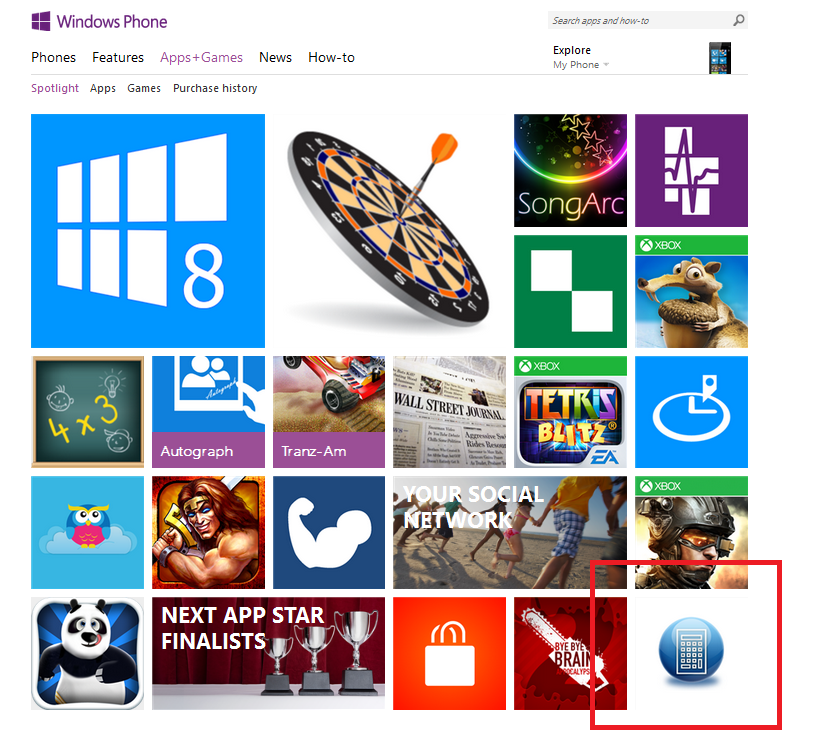
Over the last week we have received multiple emails from Microsoft letting us know that our apps Timezone Converter, XKCD Viewer and Convert My Units have been featured in the Windows Phone Store (see screenshot below of Convert My Units). The free exposure has been nice and getting an endorsement from Microsoft on the quality of our apps feels great too. Click here to see the factors that Microsoft use to determine which apps will be featured on their store.


Tuesday, May 28, 2013

Convert My Units V1.1 is out

We recently updated our app 'Convert My Units'. Here is a rundown of the main changes and how we made them:

Negative temperature input handled
Not sure how this issue got by us in v1.0, but when trying to input temperatures the user was only given a number-pad with no minus symbol. Fortunately the following comment alerted us to the issue:

Would give 4 stars if Temperature conversion fixed: NO negative temperature input. If not interface is pretty good, I mean intuitive.

This is an easy fix.  Essentially we just needed to change the input scope on our input textbox for temperature from "CurrencyAmount" to "CurrencyAmountAndSymbol" as per below:

 <TextBox Name="textBoxTemperature" Text="1" InputScope="CurrencyAmountAndSymbol" />

Selecting of results for copy/paste handled
This is one feature that is pretty useful in a unit converter, as user's may want to transfer results from our app into an email or document without having to transcribe.  in v1.0 our results were displayed in a textblock which is a control that does not allow text selection.  The best solution seems to be to replace the textblock with a textbox.  However using a vanilla textbox looked a little "cheap" so we needed to override the style so that the textbox looked like a textblock. 

To do this we just needed to add some custom style to our xaml page as per below:

 
<Grid.Resources>
<Style x:Key="ResultsTextBox" TargetType="TextBox">
<Setter Property="Foreground" Value="{StaticResource PhoneForegroundBrush}" />
<Setter Property="IsReadOnly" Value="True" />
<Setter Property="TextWrapping" Value="Wrap" />
<Setter Property="Template">
<Setter.Value>
<ControlTemplate>
<Grid>
<ContentPresenter x:Name="ContentElement" />
</Grid>
</ControlTemplate>
</Setter.Value>
</Setter>
</Style>
</Grid.Resources>

...and then reference the style "ResultsTextBox" in our textbox

 <TextBox Height="71" Foreground="Red" Margin="10,-5,0,0" TextAlignment="Center" FontSize="40" FontWeight="Bold" Name="textblockVolumeResult" Text="" Style="{StaticResource ResultsTextBox}" />

Background color added to listboxes to improve readability
We have also received some feedback saying that sometime certain values were difficult to read because of the background image and the fact that the selection listboxes were transparent.  The solution was to add some background style to the selection boxes.  As all Windows Phone apps need to handle the phones default light and dark themes the best way to do this was just to leverage the phones static resource style which automatically adapts to the phones theme.  So for each listox we just set the Border Brush and Background to the static resources used by the default text boxes.  See below:

<ListBox BorderBrush="{StaticResource PhoneTextBoxEditBorderBrush}" Background="{StaticResource PhoneTextBoxBrush}" Foreground="{StaticResource PhoneTextBoxForegroundBrush}" Name="listVolumeFrom" BorderThickness="1" Margin="0,0,60,0" ItemContainerStyle="{StaticResource ListBoxItemStyle1}">

 
See the following screenshot of how this looks.  These static resources have built in opacity which looks quite nice with our panorama background image.


Summary
So that's a majority of the changes. So far the response has been pretty good since the updates release about 5 days ago.  Advertising revenue from this app is up significantly and it has reached the top 10 unit conversion apps in the following selection of countries:

Germany - 5th
Ireland - 8th
New Zealand - 9th
Great Britain - 10th
USA - 10th
Australia - 10th

We have just started planning the next round of improvement to this app and adding a currency conversion component seems to be at the top of the list.   If you have any feature requests or suggestions leave us a comment.